Support Line: +90 212 383 32 32

 TR
TR
 EN
EN
 RU
RU
 UZ
UZ


Account
Cart
Go go top





Product Description
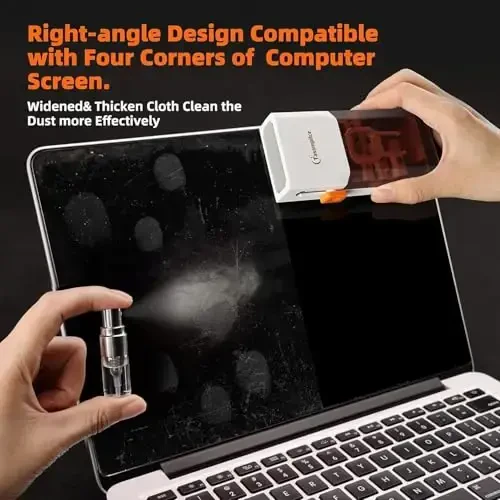
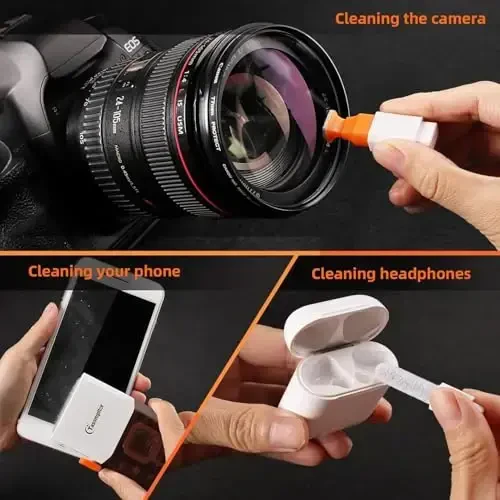
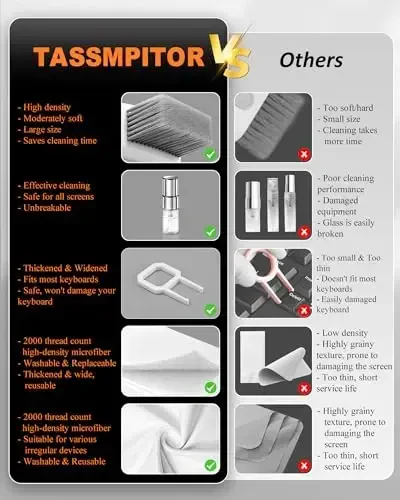
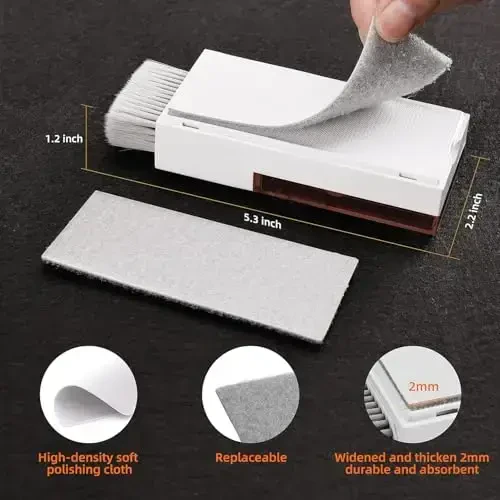
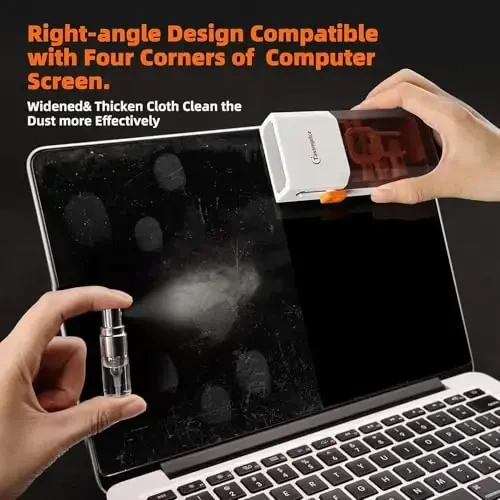
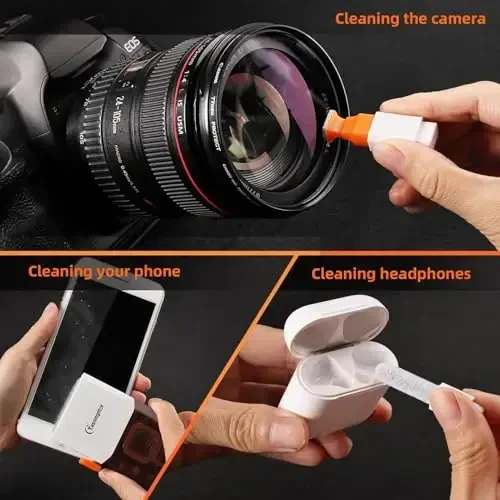
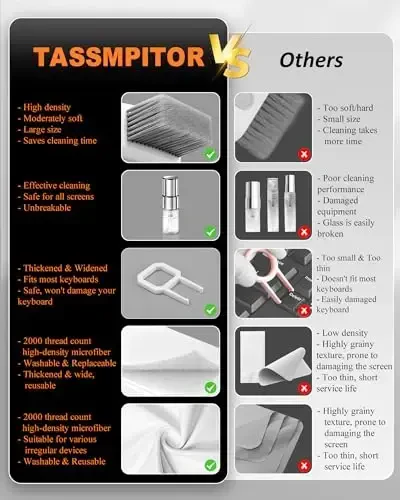
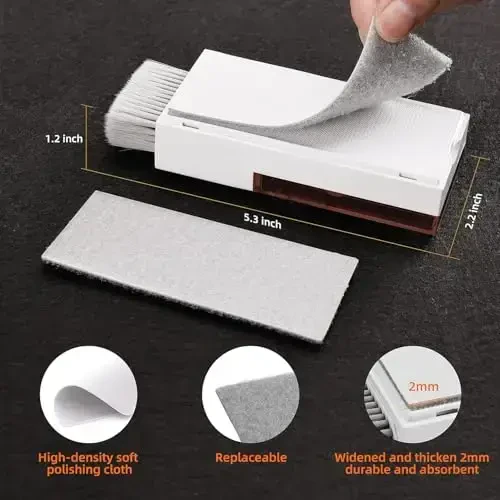
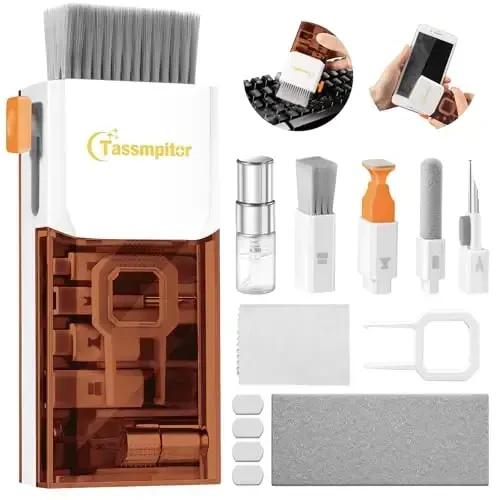
Deep clean your electronic devices with the Tassmpitor Laptop Screen Keyboard Cleaner Kit! This All in 1 electronic cleaning kit is the perfect solution for all your devices, from MacBooks to iPads, iPhone Pros to cell phones. With its patented design and stylish brown appearance, it's not only effective but also an aesthetic product. Thanks to the tools included in the set, you can safely clean all kinds of surfaces from your tablets to your computers, PC monitors to TVs, and even camera lenses.This comprehensive cleaning kit helps you extend the life of your devices and keep them looking like new. The retractable large brush easily cleans dust and dirt from keyboards, while the mini high-density brush removes stubborn residues between keys. The metal pen tip is ideal for removing tough stains, especially on laptop hinges and between keys. The flocking sponge is perfect for cleaning earphone charging cases, and the thin soft brush is specially designed for delicate surfaces.The 2 polishing cloths included in the Tassmpitor cleaning kit allow you to clean your screens without scratching them. When used with the recyclable cleaning spray, it leaves no streaks on your screens, does not cause color fading, and does not shed lint. High-quality microfiber cloths are both soft and durable, keeping your expensive device screens safe. The set also includes 5 spare cloths.This multi-functional gadget not only cleans keyboards and screens but is also suitable for delicate surfaces such as DSLR camera screens and lenses. The soft plastic lens cleaning pen helps you clean your lenses without scratching them. In short, the Tassmpitor cleaning kit makes it easy and safe to maintain all your electronic devices, from smartphones to camera lenses, laptops to headphones. To be safe while cleaning your devices, turn them off and unplug them before starting cleaning. Be careful when using liquid cleaners and always follow the product's instructions for use. The Tassmpitor screen cleaning kit will be your new favorite tool for taking care of the things you value because it is so easy to use!
Product Features
Additional Information
Turn off and unplug your devices before starting cleaning. Use liquid cleaners carefully and follow the product's instructions for use. Turn the laptop upside down to remove large particles from the keyboard. Gently wipe the screen in one direction, avoiding circular motions and excessive pressure. Use a dry microfiber cloth to polish the surface. The Tassmpitor screen cleaning kit makes it easy and safe to care for your electronic devices.
 TASSMPITOR









 100% Original Product
 100% Secure Payment
 Return Possibility Within 14 Days
 Delivery in 7-10 Business Days
 Similar products
Similar to this product!
Similar products
Similar to this product!
 Complete Your Combination
Kombinatsiyalangan mahsulotlarni ko'ring!
Complete Your Combination
Kombinatsiyalangan mahsulotlarni ko'ring!
 Product Reviews
See the comments!
Product Reviews
See the comments!


 Whatsapp Support
 Telegram Support
 Size Chart







![Misea Magnetic for iPhone 16 Pro Max Case Compatible with MagSafe [Never Yellowing] [Military Grade Drop Protection] Full Camera Lens Protector Plating Soft Clear Phone Case for Women 6.9](https://witcdn.modazone.co/misea-magnetic-for-iphone-16-pro-max-case-compatible-with-magsafe-never-yellowing-military-grade-drop-protection-full-camera-lens-protector-plating-soft-clear-phone-case-for-women-69-black-phone-case-misea-3738130-53-K.webp)
![Misea Magnetic for iPhone 16 Pro Max Case Compatible with MagSafe [Never Yellowing] [Military Grade Drop Protection] Full Camera Lens Protector Plating Soft Clear Phone Case for Women 6.9](https://witcdn.modazone.co/misea-magnetic-for-iphone-16-pro-max-case-compatible-with-magsafe-never-yellowing-military-grade-drop-protection-full-camera-lens-protector-plating-soft-clear-phone-case-for-women-69-black-phone-case-misea-3738131-53-K.webp)
![Misea Magnetic for iPhone 17 Pro Case Compatible with MagSafe [Never Yellowing] [Military Grade Drop Protection] Full Camera Lens Protector Plating Soft Clear Phone Case for Women, Green - MISEA](https://witcdn.modazone.co/misea-magnetic-for-iphone-17-pro-case-compatible-with-magsafe-never-yellowing-military-grade-drop-protection-full-camera-lens-protector-plating-soft-clear-phone-case-for-women-green-phone-case-misea-3690001-53-K.webp)
![Misea Magnetic for iPhone 17 Pro Case Compatible with MagSafe [Never Yellowing] [Military Grade Drop Protection] Full Camera Lens Protector Plating Soft Clear Phone Case for Women, Green - MISEA (1)](https://witcdn.modazone.co/misea-magnetic-for-iphone-17-pro-case-compatible-with-magsafe-never-yellowing-military-grade-drop-protection-full-camera-lens-protector-plating-soft-clear-phone-case-for-women-green-phone-case-misea-3690002-53-K.webp)
![Misea Magnetic for iPhone 16 Pro Max Case Compatible with MagSafe [Never Yellowing] [Military Grade Drop Protection] Full Camera Lens Protector Plating Soft Clear Phone Case for Women, Titanium Gold - MISEA](https://witcdn.modazone.co/misea-magnetic-for-iphone-16-pro-max-case-compatible-with-magsafe-never-yellowing-military-grade-drop-protection-full-camera-lens-protector-plating-soft-clear-phone-case-for-women-titanium-gold-phone-case-misea-3738047-53-K.webp)
![Misea Magnetic for iPhone 16 Pro Max Case Compatible with MagSafe [Never Yellowing] [Military Grade Drop Protection] Full Camera Lens Protector Plating Soft Clear Phone Case for Women, Titanium Gold - MISEA (1)](https://witcdn.modazone.co/misea-magnetic-for-iphone-16-pro-max-case-compatible-with-magsafe-never-yellowing-military-grade-drop-protection-full-camera-lens-protector-plating-soft-clear-phone-case-for-women-titanium-gold-phone-case-misea-3738048-53-K.webp)
![Misea Magnetic for iPhone 15 Case Compatible with MagSafe [Never Yellowing] [Military Grade Drop Protection] Full Camera Lens Protector Plating Soft Clear Phone Case for Women, Silver - MISEA](https://witcdn.modazone.co/misea-magnetic-for-iphone-15-case-compatible-with-magsafe-never-yellowing-military-grade-drop-protection-full-camera-lens-protector-plating-soft-clear-phone-case-for-women-silver-1447500-phone-case-misea-3762176-42-K.webp)
![Misea Magnetic for iPhone 15 Case Compatible with MagSafe [Never Yellowing] [Military Grade Drop Protection] Full Camera Lens Protector Plating Soft Clear Phone Case for Women, Silver - MISEA (1)](https://witcdn.modazone.co/misea-magnetic-for-iphone-15-case-compatible-with-magsafe-never-yellowing-military-grade-drop-protection-full-camera-lens-protector-plating-soft-clear-phone-case-for-women-silver-1447500-phone-case-misea-3762177-42-K.webp)
![Misea Magnetic for iPhone 16 Plus Case Compatible with MagSafe [Never Yellowing] [Military Grade Drop Protection] Full Camera Lens Protector Plating Soft Clear Phone Case for Women 6.7](https://witcdn.modazone.co/misea-magnetic-for-iphone-16-plus-case-compatible-with-magsafe-never-yellowing-military-grade-drop-protection-full-camera-lens-protector-plating-soft-clear-phone-case-for-women-67-deep-blue-1447509-phone-case-misea-3762266-42-K.webp)
![Misea Magnetic for iPhone 16 Plus Case Compatible with MagSafe [Never Yellowing] [Military Grade Drop Protection] Full Camera Lens Protector Plating Soft Clear Phone Case for Women 6.7](https://witcdn.modazone.co/misea-magnetic-for-iphone-16-plus-case-compatible-with-magsafe-never-yellowing-military-grade-drop-protection-full-camera-lens-protector-plating-soft-clear-phone-case-for-women-67-deep-blue-1447509-phone-case-misea-3762267-42-K.webp)